chaseincats
Community Member
-
Joined
-
Last visited
Everything posted by chaseincats
-
@240260280 Good plan, very methodical - I'll do that probably tomorrow evening. Regarding the tape, I'm guessing you mean just electrical tape wrapped around the WOT contact, right? @Captain Obvious Interesting idea, I might take that up down the road after everything is setup properly @madkaw Good to know on the max leanness number for WOT thx
-
Thanks @Captain Obvious & @siteunseen I definitely think I'll need to keep the TPS switch plugged in in some form as the car drives like a wet shoe without it lol
-
Ok gang, I have some pretty big findings. Our issue is very much the TPS. I was driving and getting in the high 13s after leaning it way out. Frustrated, I pulled over and unplugged the TPS and immediately cruise changed from the 13s to the 17s. The next plan (probably tomorrow) will be to configure the car to get low 15s (good target?) on cruise with the TPS unplugged, then fiddle with the TPS pins until I am able to get the proper cruise with it plugged in. The problem very much is a lack of space between the cruise and WOT pin as I was barely able to hold it in the 14s with some really finite pedal work when it was plugged in.
-
Why not just bend it back delaying when the center pin touches it?
-
That's odd but I don't see how it would change anything. I thought he bent the main support pin of WOT back.
-
Sounds great, thanks!
-
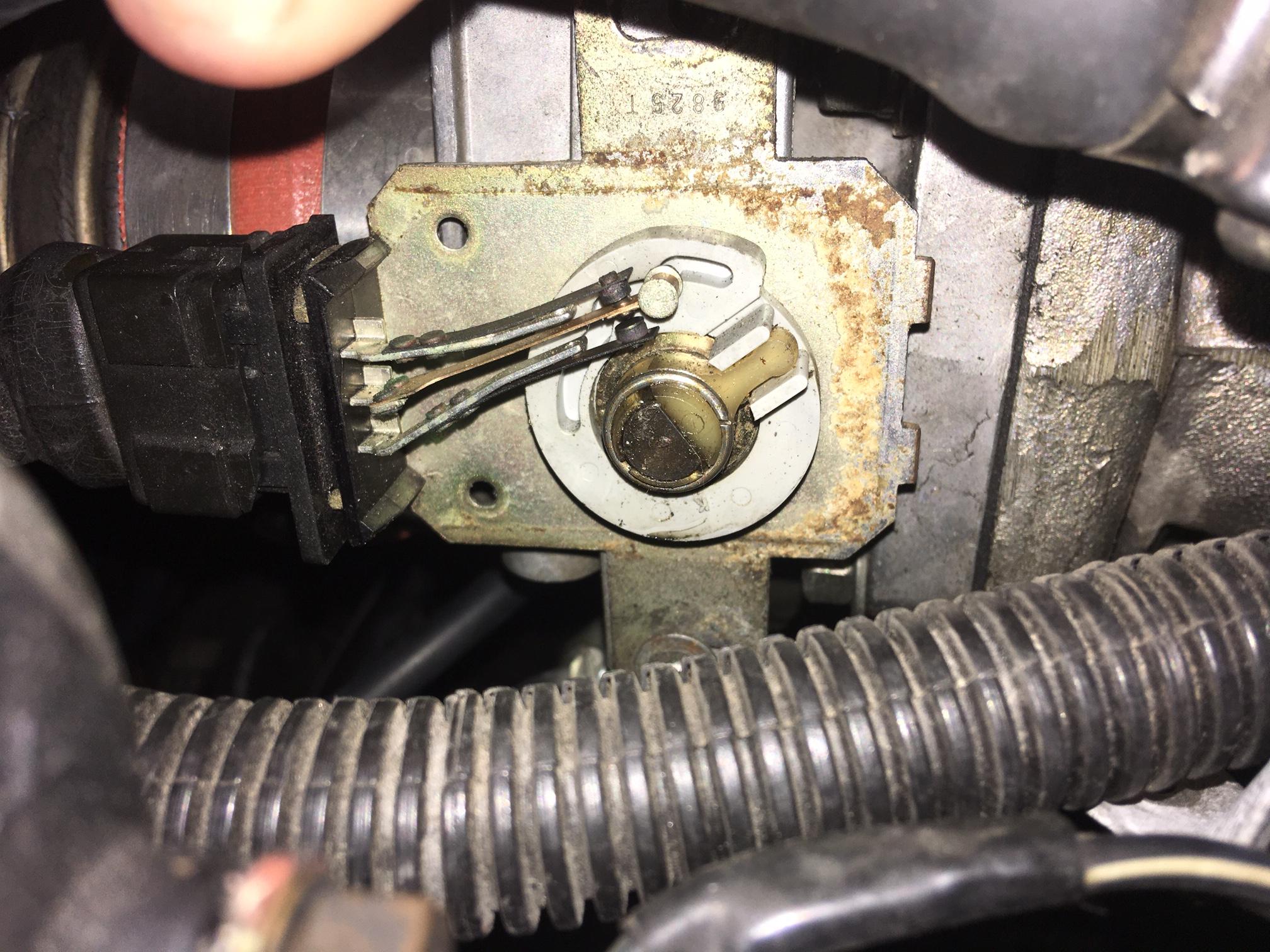
Wow ya that is a huge difference compared to the pic I put up last night. I'll get some numbers/rpms for you near the end of the week and then I'll do some bending. Any idea what RPM you have to hit before it connects to the WOT tab? I set mine using a multimeter on the bottom two pins and twisted the sensor so that when it got above 1400 the contacts would lose continuity.
-
Can you pop the cover off and take a picture of the arm spacing? That would be awesome
-
Gotcha - I originally set mine using the 1400rpm method and haven't fiddled with it yet - but now I know not to! Ya I was thinking about just bending the lil WOT contact arm a bit but I should have new numbers for you Thursday or Friday night before I fiddle wit it. My reasoning for wanting to bend the WOT enrichment pin would be that it seems to think freeway driving (3500 rpm) counts as WOT which seems a bit silly to me, no? The adventure continues haha.
-
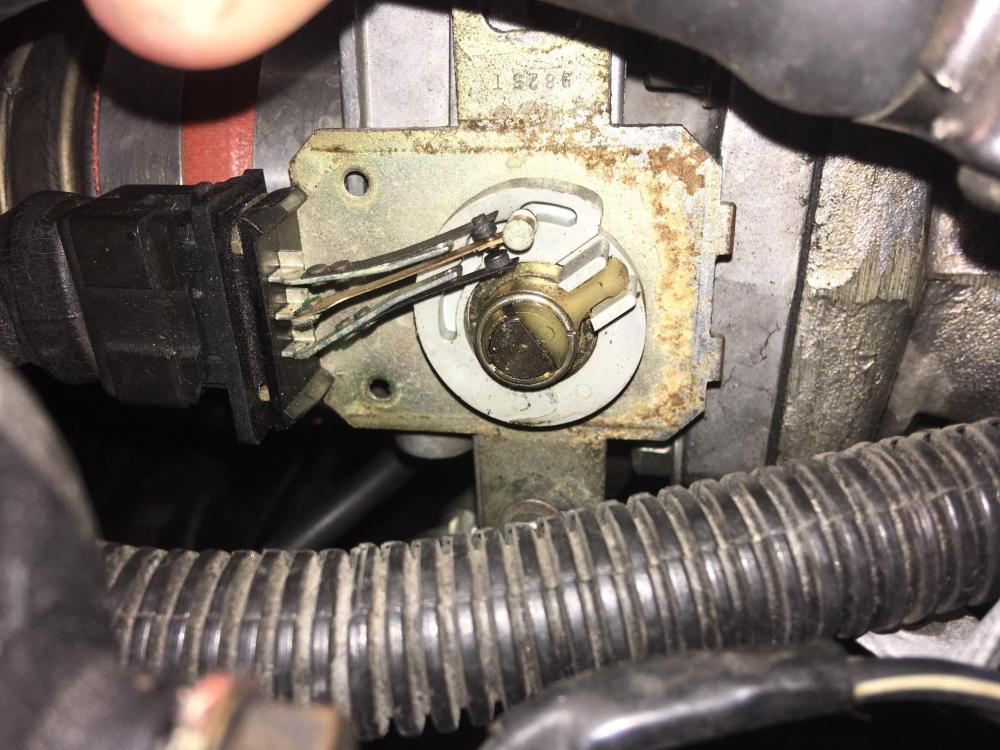
Awesome, I'll respond in there, thanks! Brief update - I didn't drive the car at all this past weekend as I left my gauge powered up when I scampered up the stairs to write the previous numbers post which subsequently drained my battery when I went to start it a few days later lol. I got the car going in the driveway today and noticed that with the car set as lean as it is, my idle speed dropped to around 450, so I brought that back up to 800 and the idle is sitting at around 14.7. The idle air bypass screw is indeed turned all the way in and the only way to lean out the idle further is to retard the black gear. I think at this point, that is just how it will have to sit. When playing with the throttle, I noticed in cruise mode it will sit in the mid 15s and pushing the linkage to when the WOT pin connects on the TPS, brings the gauge to the mid 12s which all look really good (although when the car is under load I'm expecting the numbers to change a bit). That lead me to the TPS configuration question because it seems that the cruise mode leanness only lasts a short amount of pedal travel - maybe only an inch or so. I can check tomorrow at what rpm the WOT pin connects in the TPS if that information would be of some help? I attached a picture of my TPS but its in a different orientation because of the weber throttlebody. The bottom pin in the WOT pin - should I bend it down somewhat?
-
Gotcha so it looks like my TPS is set properly then. Out of curiosity, why isn't TPS set like some folks above noted where the pins separate once you touch the pedal? That would seem like the way to get better mpg and not throw extra gas in there if the car is already moving, no?
-
Right, but what I mean is AtlanticZ says that throttle movement up to 1400rpm should be counted as "idle" which sounds strange.
-
When adjusting the throttle position sensor (TPS) I'm seeing two schools of thought. One says the idle enrichment arm should be connected to the middle contact until 1400rpm (atlanticZ) and a bunch of other folks saying the idle enrichment contact should disconnect once you hit the pedal which makes more sense to me. Any ideas? I found this thread which discusses it: https://www.classiczcars.com/forums/topic/25240-tps-adjustment/
-
Sorry to bump a 10 year thread up but I'm a bit confused. Should I adjust my TPS so that the idle pin disengages from the center pin with pedal movement or at 1400 rpm?
-
So I took it out, unfortunately there was traffic but after fiddling with it I definitely have control over the idle again. I really moved quite a few teeth on the black gear (maybe 13?) and got the car to cruise at 14.7 but it did really feel anemic so I dropped it down a few teeth. That said, there really was too much traffic to get reliable numbers so I think I'm going to put this on hold until the weekend when I can take it on the highway and get better numbers for you folks.
-
Well here's something interesting - I took the cap/diaphragm out last night to glue a tiny pinhole and now the bottom hose port not longer holds vacuum but the top now does. I think I'm going to plug the big hose directly into the canister and end this back and forth with the can.
-
Haha those numbers will be coming late afternoon. I'm going to run/tune it the evap disconnected later today - that way we take the potential vacuum leak out of the equation. Once it's set, I'll reconnect evap and see if the numbers change with it connected probably on Thursday. We're so close I can taste 14.7 lol Just to confirm, ideal would be this, correct?: Idle: 14.2 Cruise: 14.7 WOT: 12.3
-
I went to a local junkyard today that has some of these cars and grabbed a ring and diaphragm (you are absolutely right - there was a pinhole poked through where that dimple is). While I was there, I brought my vacuum hand pump and tested the cars on the lot. A bunch of them (mine now too) held vacuum on the larger lower hose but none held vacuum on the upper smaller one even though the diaphragms looked good...
-
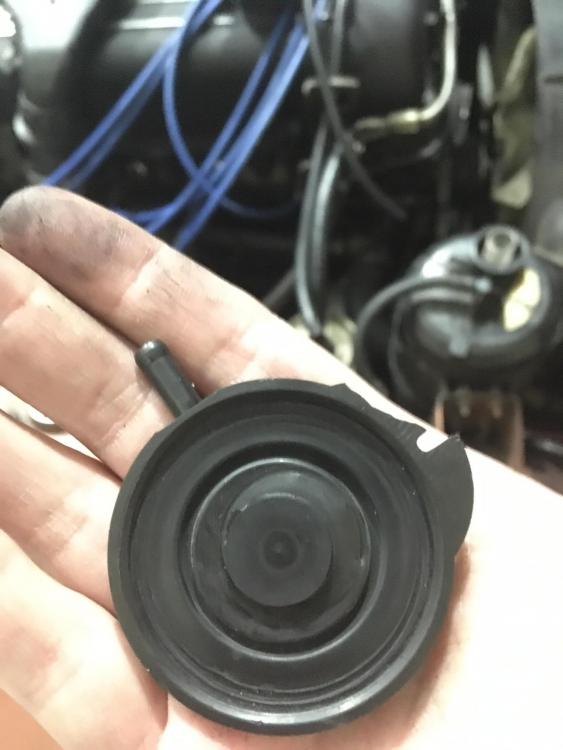
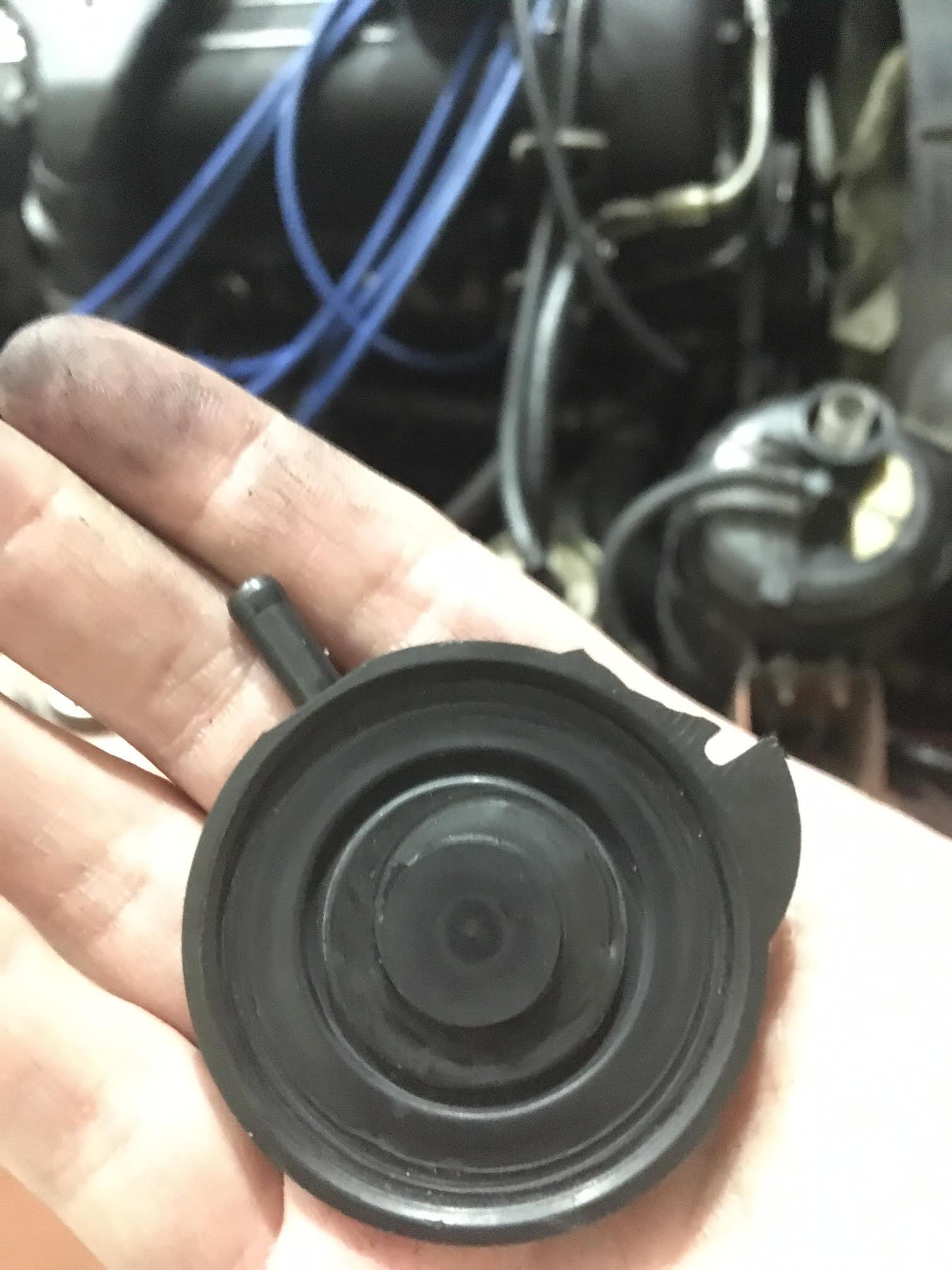
So I went downstairs and popped the cap off the canister and took a couple of pictures of what I found. The diaphragm doesn't seem to be torn so I flipped the diaphragm over and put the cap back on (pictured is how it was originally) to see if that was the issue then tried my vacuum gauge but it sounds like vacuum is escaping around the cap. Any ideas? EDIT: the diaphragm was leaking around the sides and had some small tears. Since these are nla, can I just plug the big hose directly into the top of the canister? That would kill the on-demand part from the throttlebody but would that allow the canister to still function?
.thumb.jpg.798b9d669472489347251eecc14eb760.jpg)
-
It seems neither inlet holds vacuum well. While the big hose's end won't hold vacuum at all, the smaller hose's valve can be pumped up with my hand-held vacuum gauge but the needle quickly falls after you stop pumping. I did try running the car last night with the large hose plugged into its intake manifold port (I didn't have the smaller one plugged in for whatever reason) and sprayed the canister's valve with starter fluid to see if the engine idle changed but oddly it didn't. How can it be leaking vacuum but not raise the engine idle when sprayed?
-
I wanted to avoid that stuff but if you think that's the only way then I'll go grab some. You need to wait 24h before starting the car, right? As a sidenote, could it be that since my gasket doesnt have the other side of the screw holes, the screws are bowing it out, creating the leak? EDIT: Do you think its possible to fix my carbon canister's leaky vacuum valve? Are these even serviceable?
-
@madkaw It's strange because I used some light sandpaper and sanded both the intake and and cold start valve side a well as the gasket and it still didn't work. @Captain Obvious The CSV definitely is used in the winter since I think it is triggered when the coolant is below just 50 degrees (even got a new one when mine died) lateron I wired it so that it triggers during each start regardless of outside temp because the car just starts so quick with it - very satisfying haha. I later figured out though that if you are starting it before the engine has time to cool it basically floods the mixture and you will be stranded until the engine cools down (ask me how I know) so I undid that. What do you mean by silicone sealer - do you mean RTV gasket marker? I was going to head to autozone to grab some gasket paper and cut a new one, but you think a new dry gasket won't do much?
-
I actually have the perfect solution for you guys. This is what I did and it is a very happy medium between a zippier car but without the issues of driving a super light flywheel: https://www.californiadatsun.com/flywheel/lightened-resurfaced-balanced-steel-non-turbo-225mm-flywheel.html The car definitely is quicker but not a pain to drive at all. I paired that with the 2+2's 240mm clutch kit for extra grip (the owner of that site can find you a 240mm flywheel if you call and ask). It was professionally lightened/balanced from a 23/24lb flywheel (the 2+2's is heavier of course) to around I think 17-18lb (I don't remember).
-
Looks like there's definitely egg on my face - I will be eating crow for dinner. @madkaw @Captain Obvious There was indeed a non-trivial vacuum leak coming from the cold start valve's gasket. Regarding the valve on the carbon canister, are those supposed to hold vacuum or are they a pass through because mine seems to bleed vacuum on this vacuum hand pump I got. After covering the cold start valve inlet hole, the gauge's idle went from 17 to 13 immediately - I think we're onto something. The cold start valve gasket had some bumps and unevenness to it which I sanded down and it still leaked after I screwed the bolts in with vigor, so it looks like I need a new one of those. I don't understand how it was leaking though as there are no rips...
-
Ok, so update for you guys: I went to autozone and grabbed a handheld vacuum pressure tester and discovered that my carbon canister valve didn't hold vacuum and was creating a vacuum leak when the pedal was pressed (this is supposed to hold vacuum, right?). So I disconnected the T-connector to the throttlebody and capped the hose port on the intake manifold and now I'm able to get to the 14s with a WAY leaner setting but the idle was still pretty lean up there. I tried what @Captain Obvious was saying and started it then watched the gauge as I unplugged the TPS connector at idle and it did lean out, so that should be working. I checked my altitude switch and that is set at off currently. I've smoke tested the engine a few times so it shouldn't have any leaks in the AFM boot etc though. The engine is warm now, so I'll wait until it cools off tomorrow to spray it with flammable chemicals lol. It did occur to me that maybe the idle speed screw seal is worn down or something inside, is that a thing? I have no idea how that looks internally. EDIT: my impatience got the best of me so I grabbed a fire extinguisher and got spraying. There MAY be a vacuum leak in the cold start injector inlet (I was messing with this recently). Going to grab a pack of cigarettes and a pump BBL.

.jpg.05405251fb2d8625337790aa607cbb97.jpg)