1972 JCR 240z - Open Discussions - Classic Z Car Club Skip to content

Featured Replies

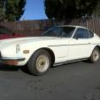
I haven't been able to post on all the z forums I think this is the last one lol.  I picked up a 1972 240z with Jim Cook Racing California Z body kit on it.  This car was completely restored in 1981 by the first owner, I picked it up from the second owner who drove it from 83-93 and left it garaged since. I vacuumed out the rats nest, gave her a good wash today after 25 years of dust, did an oil change(so black and reeked of gas) wiped down all surfaces from rat pee, and treated the battery tray with acid treatment and painted it since it's empty and only surface rust currently.

IMG_0067.JPG

IMG_0073.JPG

IMG_0078.JPG

IMG_0099.JPG

IMG_0100.JPG

IMG_0101.JPG

IMG_0133.JPG

IMG_0135.JPG

IMG_0136.JPG

IMG_0138.JPG

IMG_0140.JPG

Nice!  I bet the rats are really going to miss it.  :D

Dennis

Might be the first case I've seen where someone intentionally installed the ginormous crash bumpers.

I bought a motor a few years ago that had gas in the oil pan from the carbs being out of the ballpark rich.  Took the valve cover off and the valve train looked like new for om the gas wash. LOL

Never seen square headlights on a 240, interesting looking car. Shined up nicely! 

Real nice find! I really loved that body kit as a teenager :)

JCRCalZ.jpg

By the looks of the DoD vehicle decal on the windshield, it was once owned by a junior enlisted person.

S
Sponsored
Advertisement
Go Ad-Free
No ad showing? Ads help support ClassicZcars. If you use an ad blocker, please consider allowing ads on this site or Go Ad-Free.
  • Author
2 hours ago, DatsunZGuy said:

Real nice find! I really loved that body kit as a teenager :)

JCRCalZ.jpg

By the looks of the DoD vehicle decal on the windshield, it was once owned by a junior enlisted person.

Good eye! The guy I bought it from bought when he returned from Guam in 83, but he bought from a LCDR I think from the original for sale sheet that was with all the stuff.

Create an account or sign in to comment

Account

Navigation

Search

Search

Configure browser push notifications

Chrome (Android)
  1. Tap the lock icon next to the address bar.
  2. Tap Permissions → Notifications.
  3. Adjust your preference.
Chrome (Desktop)
  1. Click the padlock icon in the address bar.
  2. Select Site settings.
  3. Find Notifications and adjust your preference.