Skip to content

Rubber Hose on gas tank

Featured Replies

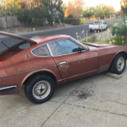
Just gassed up my new to me 240 z.  I noticed a rubber hose leaking on the bottom drivers side. it comes out of a port in the gas tank then goes up.  Is this just a vent hose?  How do I access it?

Look at his pictures,  you'll see those two to the right of the sending unit.  One is supply the other return.  I believe all the vent lines are on top of the tank.

Click on the top "duffymahoney replied to a topic".   Or just click that previous sentence's blue part. 


Edited by siteunseen

FWIW - Here's a pic of the topside of my tank that shows the location of the three vent lines.

Tank-01.jpg

Quick question, which part of the tank gets the thick pads, the high or the low part?

Here's my 240 tank.  I can't see any difference in thickness but I know you have a 280 so maybe there is on those?

post-24724-14150829134659_thumb.jpg

Trying to get a bigger image...

DSC00545.jpg

Edited by siteunseen

  • Author
Here's my 240 tank.  I can't see any difference in thickness but I know you have a 280 so maybe there is on those?
post-24724-14150829134659_thumb.jpg
Trying to get a bigger image...
post-24724-14150829134659.jpg

Where does the outlet on the right side go?


Sent from my iPhone using Classic Zcar Club mobile

Go here: http://www.classiczcars.com/files/

Download the FSM for your car.

Look in the FE section, usually around page 4. It shows the routing of the hoses.

In addition to the FSM as recommended by Steve, here's a pic that might help with the routing, ...and yes, I managed to score some new Nissan vent hoses a few years ago before they became unobtainium.

13.jpg

It's the silver looking on in Mr Arnett' s picture. Above the tailight assembly and it runs across the width of the hatch.


Create an account or sign in to comment

Remove Ads

Important Information

By using this site, you agree to our Privacy Policy and Guidelines. We have placed cookies on your device to help make this website better. You can adjust your cookie settings, otherwise we'll assume you're okay to continue.

Account

Navigation

Search

Search

Configure browser push notifications

Chrome (Android)
  1. Tap the lock icon next to the address bar.
  2. Tap Permissions → Notifications.
  3. Adjust your preference.
Chrome (Desktop)
  1. Click the padlock icon in the address bar.
  2. Select Site settings.
  3. Find Notifications and adjust your preference.