Skip to content

Another Newb says hi

Featured Replies

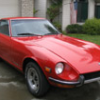
It is time for me to introduce my self. My name is Bryan I live near Fresno, CA. have been infected for over a year now. Z- 5/70' 240 matching #s series 1, (yes I’m a hatch venter). Currently rebuilding original 4 speed, have a later 5 speed moving the car for now. I have been slowly getting the car back to stock. Mostly interior cosmetics were messed with. A previous owner liked shopping for shiny accessories at Pep Boys yuck! But the Z is feeling better now. I drive it every day to work, it is not happy with sitting! I will post pics after my Son the auto photographer takes some he will allow. The frosty pic in the avatar is my work.

I have learned a great deal the past year from you. Thanks for letting me say hi.

Bryan

Ahoy there! I too am a new Z'er and I would like to welcome ya to the best place you can be if you own a classic Z!

-Jared

If we ain't got it, we can get it, or at least tell you where to go.

Some of us here even make stuff just for the Z world. I myself, make a headlight relay upgrade for the 70' to 73' 240Z. Will (HLS-30) and I are working on prototype L.E.D. integration for the whole car, to lower power consumption and current flow through the stock harness (which is the major factor in the melting of fusebox's and breaking of switches and other sorts of problems) in the early Z's.

Most of us are glad to answer any questions you have if we are in the know.

Welcome to "classic Z cars", the very best sourse for any body with an early Z,

Dave in WA State.

hello eulb1, im new to this forum too. so far every one here has been great.

G'Day there to all you Newbies.

WELCOME.

Yes, you'll find everyone to be friendly, informative, helpful, forgiving and patient.

After all, they've put up with me for a couple of years now. ROFLROFL

Rick.

:devious: :devious:

If we ain't got it, we can get it, or at least tell you where to go....

As they have told me on a few occasions :classic:

Hi! This is my first post in here also..

Tanks for a great site with a whole lot of good info!

Create an account or sign in to comment

Remove Ads

Important Information

By using this site, you agree to our Privacy Policy and Guidelines. We have placed cookies on your device to help make this website better. You can adjust your cookie settings, otherwise we'll assume you're okay to continue.

Account

Navigation

Search

Search

Configure browser push notifications

Chrome (Android)
  1. Tap the lock icon next to the address bar.
  2. Tap Permissions → Notifications.
  3. Adjust your preference.
Chrome (Desktop)
  1. Click the padlock icon in the address bar.
  2. Select Site settings.
  3. Find Notifications and adjust your preference.