Skip to content

Is this door guard riveted on??

Featured Replies

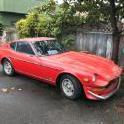
are these stock door guards riveted on or glued on?? is that a rivet on the rail going right into the door???


any feedback would be great as i want them gone..

guard.jpg

They are riveted on. there will be 4 or 5 rivets in each piece under the rubber

  • Author

shoot that sucks...   can i find new rubber for  them?? better to do that then have to patch holes. ???


Holes have to be welded closed. That requires paint. I suspect there is a source for new rubber but don't know where

I have nos rubber for them, spare set came with my car. Happy to sell them on to someone who will use them.

Z Car Source also sells the rubber moulding by the foot. It's a pretty good match to the original. I replaced all of mine on my '71 Z because I didn't want to have to fill the rivet holes if the moulding was removed. You will need a drill and a pop-rivet tool. Wasn't too hard a job, the trickiest part was getting the length of each rubber segment correct. Cut them a little long, they can always be trimmed but if they're too short you're SOL. I just noticed that the rubber in your picture looks like it has a slightly lower profile than the one on my car. Not sure if the various dealers used more than one source for the rubber trim.

Edited by Zpenman
Forgot to add something.

Just to be clear, there is no such thing as"stock"door guards. They are an after market product put on by dealers and owners. If you like the look, and do not want to go through the work of welding the holes up and repaint, than just buy any aftermarket guards you like and replace them. Although I now see that your car is not a 240, but a 260-280 so I am not sure if the later models came with  factory door guards.

Edited by 240dkw

Create an account or sign in to comment

Remove Ads

Important Information

By using this site, you agree to our Privacy Policy and Guidelines. We have placed cookies on your device to help make this website better. You can adjust your cookie settings, otherwise we'll assume you're okay to continue.

Account

Navigation

Search

Search

Configure browser push notifications

Chrome (Android)
  1. Tap the lock icon next to the address bar.
  2. Tap Permissions → Notifications.
  3. Adjust your preference.
Chrome (Desktop)
  1. Click the padlock icon in the address bar.
  2. Select Site settings.
  3. Find Notifications and adjust your preference.