Skip to content

1972 s30z

Featured Replies

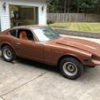
Hi everyone. This will be my first time posting here. Just bought a 1972 S30Z last Friday and thought I would join a good forum. The Z has typical rust on floor boards and hatch area but other was not too bad.

post-27268-14150819020672_thumb.jpg

Welcome to the site! As you probably know there are lots of knowledgable peopeple here who are more than willing to help.Post some more pictures when you get time.

Mark

  • Author

The Z came with the L28 already in it but somehow the PO had the plug wires → plugs wrong and also the plug wires → cap wrong... I've never done that before but corrected that and gave it gas and she ran! The Z has been sitting for more than two years but ran pretty nice. Will be pulling the gas tank and replacing fuel lines soon.

  • Author

They are the RS Watanabe's that I use to have on my 86 MR2. The bolt pattern was a 114.3 x 4 which made me run PCD changers on the MR2. Ended up getting the right bolt pattern Watanabe's for the MR2 and since I had these lying around I swapped out the rotted/corroded tires/wheels that were on the Z with these. A bit small but fits so much better!

Welcome to the club! You will certainly find what you are looking for, if not, just post a question. :)

  • Author

Thank you everyone! I will definitely be posting more questions as I go. First off I need a list of things the Z needs...the never ending list...

  • Author

Thank you LOL. Everything you see came with the car. The only thing I removed so far was the RF headlight cover since it only had one and a bar that ran above the front bumper. Not sure if its oem but I prefer the look with out it.

Create an account or sign in to comment

Remove Ads

Important Information

By using this site, you agree to our Privacy Policy and Guidelines. We have placed cookies on your device to help make this website better. You can adjust your cookie settings, otherwise we'll assume you're okay to continue.

Account

Navigation

Search

Search

Configure browser push notifications

Chrome (Android)
  1. Tap the lock icon next to the address bar.
  2. Tap Permissions → Notifications.
  3. Adjust your preference.
Chrome (Desktop)
  1. Click the padlock icon in the address bar.
  2. Select Site settings.
  3. Find Notifications and adjust your preference.