Skip to content

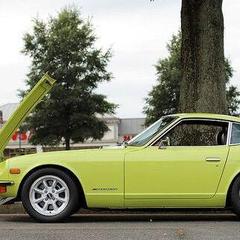
Took some photos of the lime 72

Featured Replies

Great car & colour - what is the exact colour code? I presume it is a metallic paint?

No its not metallic. Its an original Datsun Z colour 112 Yellow (aka: Lime).

heres what the colour looks like in the daylight.

543187991_df02b95181_o.jpg

I changed the levels

Now you're cooking with gas...........

The first shot, especially, is much improved.

Wow that is absolutely awesome. At first prior to reading the beginning of the thread I though Wenzell took those pictures because I know some people that tell me he is a terrific photograper. Those pictures are incredible and they prove one thing other then your talent and that is the beauty of the 240z. I wish you could take some shots of my car. You should think of producing a calendar and selling it. I would certainly buy one or 10. Great job.

After looking at the side shot I'm wondering what suspension changes have been made. Your dad has the PERFECT Z!

Oh yeah.... Please please tell me some suspension specs. :)

Jim

very nice very nice indeed I currently own the same year. my car is in the process of being restored i chose to go with the original paint which is lime geen. i didn't realize how beatiful it was going to be. thank-you so very much

  • 3 years later...

Tried to get some driving shots today. I need to practice more but I think they came out ok. My dad drove his 72 and my E34.

5773358062_95c7df1522_z.jpg

5772817801_e8f520b89c_z.jpg

5772820377_e08b23267f_z.jpg

5773360434_fb9a9567c8_z.jpg

5772823057_b4bae00923_z.jpg

5773365028_b286816a49_z.jpg

5772828611_9686e40c23_z.jpg

5773366282_ca8b0605c5_z.jpg

Create an account or sign in to comment

Remove Ads

Important Information

By using this site, you agree to our Privacy Policy and Guidelines. We have placed cookies on your device to help make this website better. You can adjust your cookie settings, otherwise we'll assume you're okay to continue.

Account

Navigation

Search

Search

Configure browser push notifications

Chrome (Android)
  1. Tap the lock icon next to the address bar.
  2. Tap Permissions → Notifications.
  3. Adjust your preference.
Chrome (Desktop)
  1. Click the padlock icon in the address bar.
  2. Select Site settings.
  3. Find Notifications and adjust your preference.