what kind of front lip is this? - Open Chit Chat - Classic Z Car Club Skip to content

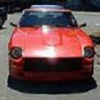
what kind of front lip is this?

Featured Replies

First, I must say that is one sweet Z.:love:

The headlight covers look good with that stripe that lines up wtih the body lines. Wish I knew the answer. Also note they did A line on the side marker lamp.

I dont think that's just black tape. It would be easy ta paint on. With clear plastic you would paint the line inside the cover. Then you cant scratch or chip it.

It is on the turn signals as well. I would guess tape or maybe a custom pinstriping company designed it.

It might be tape, if they are racing the car on the track, most sanctioning bodies require some sort of tape over the light lenses to prevent the shards of glass, or plastic from being spread all over the track. If it isn't, it does look pretty good on the headlight covers.

2manyzs got it. look @ the headlights of the car in the back :stupid:

But still looks good on the z covers.

S
Sponsored
Advertisement
Go Ad-Free
No ad showing? Ads help support ClassicZcars. If you use an ad blocker, please consider allowing ads on this site or Go Ad-Free.

Looks like it has some serious rubber meeting the ground.

Serious rubber indeed. Anyone care to guess on what type of rims those are (Riken mesh?), and are those 16's or 17's?

I suspect they're 17's.

Ceers,

Paul

thats one classy way to tape/race prep a headlight cover that's what that is

If you mean the front air dam, it looks like a common urethane air dam, most any Z parts supplier has one like it. This one looks a little different in that most have brake cooling ducts, while this one is solid. Also available in fiberglass, but they don't stand up well to curbs as well as the urethane.

Looks like the offered in the MotorSport Auto catlog P/N 50-1401.

It also looks like the one on my car:

SHOP_Day_01.jpg

Definetly out of the MSA catalogue looks like it has modified indicators and definetly a customised grille.

Create an account or sign in to comment

Account

Navigation

Search

Search

Configure browser push notifications

Chrome (Android)
  1. Tap the lock icon next to the address bar.
  2. Tap Permissions → Notifications.
  3. Adjust your preference.
Chrome (Desktop)
  1. Click the padlock icon in the address bar.
  2. Select Site settings.
  3. Find Notifications and adjust your preference.