240z cartoon - Open Chit Chat - Classic Z Car Club Skip to content

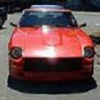
240z cartoon

Featured Replies

That's a pretty sweet little snipit of some very good work. Do you know where this is from? Is it a full movie? It's an advertisement for something..... I just can't read Japanese.

Can anyone help out here?

I'm putting a link to this post on the main page because maybe some others can help us find out where we can get this.

S
Sponsored
Advertisement
Go Ad-Free
No ad showing? Ads help support ClassicZcars. If you use an ad blocker, please consider allowing ads on this site or Go Ad-Free.

I think it's an intro for one of those Japanese Anime cartoons...

There is one (could be the same one, but I forgot its name) which is all about: cars, guns and women. Nothing else... hehe It has Vipers, Mustangs and (perhaps?) some rice burners too?

Whatever it is, they sure like the Z :D and that cant be a bad thing!

:cool:

Yes, this is an advertisement for a new game for the PS2.

It is based on a "manga" ( Japanese comic ) series from the early 90's called "Wangan Midnight", which was published in a series of small paperback book-style episodes by "Yanmaga" ( Young Magazines ).

The "Wangan" is the nickname given to the Tokyo Bayshore Route motorway which curves from Yokohama right round to Chiba, and has always been popular with street racers since it was built. There are very many comics and animated videos that use the street racing theme in Japan, but they are all rather childish and the drawings in the comics themselves are rather basic ( because of the quantity in each episode and the amount of episodes they pump out ). The stories leave rather a lot to be desired too. The animated version is rather better, and the game should be better still - but I doubt if it can play better than the mighty GT3 on PS2....

Here is a scan of a couple of the original books;

post-2116-14150792009979_thumb.jpg

No it probably wont be better than GT3... but GT3 didn't have our favourite Z in it !

GT2 has a 432 Fairlady though doesn't it?

Create an account or sign in to comment

Account

Navigation

Search

Search

Configure browser push notifications

Chrome (Android)
  1. Tap the lock icon next to the address bar.
  2. Tap Permissions → Notifications.
  3. Adjust your preference.
Chrome (Desktop)
  1. Click the padlock icon in the address bar.
  2. Select Site settings.
  3. Find Notifications and adjust your preference.