Skip to content

side mirriors

Featured Replies

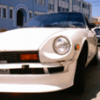
Hey u guys, check out these mirrors! i was wondering where i can get these and how are they mounted? Check out the picture attched!a>

z_boi

Here are some shots of '90-'93 Celica GT's with mirrors similar, if not identical too, the ones you displayed.

I LIKE their look!:classic:

First the '90

post-2803-14150792493737_thumb.jpg

They look too big for a zed.

I saw them in a mag the other day. I'll look again and tell you the brand name. they are definately after market mirrors.

I wouldn't want to mount any mirrors if it involved drilling through the stainless steel window frame.

I think they look totally ugly on a Z :sick:

They're big, round and have no edges on them, unlike a Z which is designed with crisp, well defined lines.

But if you like 'em, go for it!

Having side mirrors like the ones on this web page below would be enough to convince me to start drilling the window frame. They seem a bit better sized for a Z than the ones in the picture above.

http://mywebpages.comcast.net/pparaska/TercelMirrorMounting.htm

  • Author

Well, Thanks a lot guys. Lookin' at the picture again. i kinda think ur rite Alfadog. they do look a lil big for the car. I'll look around till i find some better ones. Thanks for the link 26ounce!

Ganador Mirrors were the ones i saw in a magasine on a GTR. They looked smaller than the ones on the celica pictures.

http://www.rcdevelopments.com/manufacturers/ganador/ganador-mirrors.html

ganador%20mirror-max.jpg

http://www.whifbitz.co.uk/suprawingmirrors.htm

ganadorsupra.jpg

I think they look too modern for a 240z.

That Tercel installation looks like the mirror set I got, but haven't installed from, I think, MSA. The whole install looks about the same.

Create an account or sign in to comment

Remove Ads

Important Information

By using this site, you agree to our Privacy Policy and Guidelines. We have placed cookies on your device to help make this website better. You can adjust your cookie settings, otherwise we'll assume you're okay to continue.

Account

Navigation

Search

Search

Configure browser push notifications

Chrome (Android)
  1. Tap the lock icon next to the address bar.
  2. Tap Permissions → Notifications.
  3. Adjust your preference.
Chrome (Desktop)
  1. Click the padlock icon in the address bar.
  2. Select Site settings.
  3. Find Notifications and adjust your preference.