" Blue Oval Z" Needs your help!! - Open Chit Chat - Classic Z Car Club Skip to content

" Blue Oval Z" Needs your help!!

Featured Replies

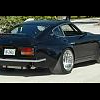
In a tough battle for "Show Off of the Week" the Blue Oval Z needs some help from the Z community.

http://www.cardomain.com/ride/2168777

It's been almost 2 years since a Z was "Showoff of the Week" and I think that BOZ is deserving. On the left side of the page half way down there will be a link "Nominate for ShowOff" log in and click on the link and you're done. Leave a comment if you want. Voting ends tomorrow night so you can vote once today, and once tomorrow!

BOZ appreciates the support!!

img3573.jpg

Edited by ZWOLF

  • Author

Thanks!

Up and running now!

Done, But it's nice to see that my 70' is in the top 6 still. "DatsunDave07's 70' 240Z.

And my 260Z is in the #10 spot under 260Z, all years.

The whole site makes me feel better about everything I've done, when people comment and give ya 5 stars and nominate ya.

Dave

Edited by Zs-ondabrain

I cast my vote. Its one of the nicest z's on the planet.

S
Sponsored
Advertisement
Go Ad-Free
No ad showing? Ads help support ClassicZcars. If you use an ad blocker, please consider allowing ads on this site or Go Ad-Free.
  • Author

Thanks for the help!

Currently in 4th, and polls close at midnight.

Need more votes! Please take a minute to help out.

Thanks!!

I cast my vote. Its one of the nicest z's on the planet.

I have seen the car before and after he painted it. There is a a pic of it in primer in my gallery.

Its a nice car. But one of the nicest in the world? Maybe if it wasnt a Ford:angry:

  • Author

6 hours to go....up to 3rd place! Vote! Vote Vote!

I added my 10 points, he needs around 15 more to vote to get him into the first spot...

Will

Just added mine. GOOD LUCK!!

power train on something like that takes a sidestep to the man hours involved in its creation. Sure ls1 would be nice but whatevs.

Create an account or sign in to comment

Account

Navigation

Search

Search

Configure browser push notifications

Chrome (Android)
  1. Tap the lock icon next to the address bar.
  2. Tap Permissions → Notifications.
  3. Adjust your preference.
Chrome (Desktop)
  1. Click the padlock icon in the address bar.
  2. Select Site settings.
  3. Find Notifications and adjust your preference.