


Huw
New Member
-
Joined
-
Last visited
-
if you're driving it on the street....I'd stick to SU's (at least in my opinion) they can be rejetted and modified for larger displacements and better flow and they seem to be inherently more flexible than some of the tripples (less stuffing round too!). from my experience the tripple tend to bog down a little in normal driving (maybe weren't set up right), it only when you open them up that they come into their own. Anyway, not a mechanic or anything, just my 2 cents. Huw
-
seems VERY dead.....fixable if u have a lot of money and time! but the rust on the roof and throughout looks shocking... to the point....if it has the choke and hand throttle levers, it is probable somewhere around 1971.... Huw
-
I think I just lost my breakfast...... that's bloody awful!
-
I'm 20, have driven the requisite bomb (1989 civic & peugeot 404 [pugsley fun tho]) for the last 2 years (australian license=18) whilst I've been restoring my 71' 240, I don't see why age should be a factor, if you are willing to work for your car (and not beg mummy and daddy for a new m3) whether you are a twenty y.o. or a 50 y.o. you have the same right. Cars are meant to be driven, and a car totalled by a 50 y.o. is the same as a car totalled by a 20 y.o. (god forbid it happens to my car or anyone elses). and hey, if you get one at 18-25, you've got longer to enjoy it and appreciate it :-). hehe Huw
-
saw that ad and laughed... accordingly the guy selling it is a bit of a schemer, (duh 35k for a zed is ridiculous! (atm)) also accordingly, the side mirrors were original on the earlier ones (no later than 71), again second hand information. love the way he says, it's ultra rare, cause looking at numbers it later than many.
-
If you want more details on Gavin's car, it was featured in the new "race" magazine (on the cover) I think it was the august edition, interesting article. Huw 71' 240z
-
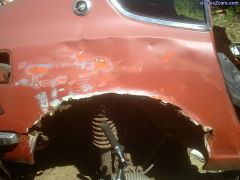 ouch, mine were like that too, was a real pain to fix, had to get a panel beater, what we did was used some chopped up front panels (same degree of flare) and fitted them up neatly. took a while but it looks good,=. just painting it all this week (time and uni permitting)