orange 73 - Internet Finds - Classic Z Car Club Skip to content
Be cautious of scammers! If you are asked to send Zelle, Paypal, or even gift cards it is likely a scam. Be smart and talk on the phone and trade real photos. Check every profile and never do business with a member who joined less than 6 months ago.

orange 73

Featured Replies

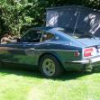
I'm starting to wonder why there have been so many low mileage, "survivor" cars that seem to be all 73's, and orange to boot....:ermm:

Maybe the cars gave the owners so much trouble they just packed them away? Or they didn't like it after they bought it?

My new orange '71 (8/70 production date) shows 59xxx miles on it. But I hardly believe that is all that's on the car. Try more like 159xxx or 259xxx miles. The odd part is that on the odometer the first number seems to be even with the other numbers. I thought that after they rolled over the first number sat higher than the other numbers. *shrug* I don't care how many miles are on it, it's mine, I love it, and I'm keeping it. ROFL

  • Author

Are the 73's really that much of a problem car or is it just a bad reputation due to the flattops?

The 73's were terrible until the factory did a recall and installed a larger engine fan, electric fuel pump and all the fuel line insulation.

After that they were better, but still not up to what the earlier cars offered. Guess a lot of people were disappointed with the 73's...

S
Sponsored
Advertisement
Go Ad-Free
No ad showing? Ads help support ClassicZcars. If you use an ad blocker, please consider allowing ads on this site or Go Ad-Free.

The Before and After on my 73'

Here is the Before with Flat tops.:sleep:

post-908-14150792748174_thumb.jpg

And the after with 71' SU's. Runs great!!

post-908-14150792748419_thumb.jpg

SoCalZ,

Is there any special reason your fuel lines are wrapped up?

It was for the vapor lock problem and I left it on because it looks better on than off. I will get around to cleaning it up so I can take it off for good.

Create an account or sign in to comment

Account

Navigation

Search

Search

Configure browser push notifications

Chrome (Android)
  1. Tap the lock icon next to the address bar.
  2. Tap Permissions → Notifications.
  3. Adjust your preference.
Chrome (Desktop)
  1. Click the padlock icon in the address bar.
  2. Select Site settings.
  3. Find Notifications and adjust your preference.