280z Front bumper conversion. Kaminari or MSA Type 3? - Page 2 - Body & Paint - Classic Z Car Club Skip to content

280z Front bumper conversion. Kaminari or MSA Type 3?

Featured Replies

  • Author
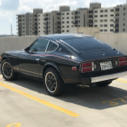
Wait, is that a Black Pearl edition? Are you sure you want change the bumpers?
It seems to me that the Black Pearl is worth more that the "regular" 280. Just curious. 


Yeah, it's a black pearl. I bought it at market value mostly stock (even had the original tires), but am not trying to make an appreciable investment of the car. Would rather have it looks he way I want. And was never a fan of those big regulation bumpers.


Sent from my iPhone using Classic Zcar Club mobile


Yeah, it's a black pearl. I bought it at market value mostly stock (even had the original tires), but am not trying to make an appreciable investment of the car. Would rather have it looks he way I want. And was never a fan of those big regulation bumpers.


Sent from my iPhone using Classic Zcar Club mobile

I felt the same way about my very stock 77. Just keep all your stock equipment!


Sent from my iPhone using Classic Zcar Club mobile
3 hours ago, Jaymanbikes said:


I felt the same way about my very stock 77. Just keep all your stock equipment!


Sent from my iPhone using Classic Zcar Club mobile

I am a bit the same way. All my mods are reversable if you drill the spot welds carefully and not all the way through, its and easy job to weld the front indicator mounts back on.

It took me about 4 hours to get the rear bumper "gap" shield of without damaging it too much.


On 8/14/2017 at 9:28 AM, wheee! said:

@Eurodat for the bumper conversion parts. His system is artwork. 

Can confirm, best option out there.  Prior to his work there wasn't a good system for mounting 240 bumpers on a 260 and even now the other systems are just copies of his work.


Edited by Kurbycar32

S
Sponsored
Advertisement
Go Ad-Free
No ad showing? Ads help support ClassicZcars. If you use an ad blocker, please consider allowing ads on this site or Go Ad-Free.

Create an account or sign in to comment

Account

Navigation

Search

Search

Configure browser push notifications

Chrome (Android)
  1. Tap the lock icon next to the address bar.
  2. Tap Permissions → Notifications.
  3. Adjust your preference.
Chrome (Desktop)
  1. Click the padlock icon in the address bar.
  2. Select Site settings.
  3. Find Notifications and adjust your preference.