GT Tail Light Uses - 240K Skyline - Classic Z Car Club Skip to content

GT Tail Light Uses

Featured Replies

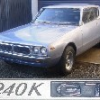
My goodness, what a URL! Converted to a small link below, and sucked the picture down to save for posterity.

Long link to the webpage

post-8596-14150802609107_thumb.jpg

All of that and his url isn't even properly formatted so all it does is stretch the page.

Much as it saddens me to say this - those lights actually don't look too far out of place on that thing.

Is this the dude Lachlan sold a set of his tail lights to?

  • Author

Sorry about the url - I did not know how to shorten it.

It's weird, the car is in Pyrmont Sydney with Queensland plates. And this guy rings a bell with me. I think I have seen him sell Stagea RS2600.s. Perhaps he imports from Japan.

S
Sponsored
Advertisement
Go Ad-Free
No ad showing? Ads help support ClassicZcars. If you use an ad blocker, please consider allowing ads on this site or Go Ad-Free.

Those lights do not look out of place at all. I've always thought from the first time I've seen the 240k tail lights that they were on the wrong car. I think Mr. K got confused and somehow switched the designs and it was too late to fix. I would love to convert my Z over to those. Dan

How odd! They do appear to be JDM C110 lights - except modified!

Notice that the red lenses are flush with the indicator and reverse lenses. This is not how they are (see attachment). The unit is also one piece, this has been separated into the two lenses. Interesting... Makes you wonder if perhaps the red lenses aren't C110 at all, but the indicators were used.

post-1243-14150802644807_thumb.jpg

Very nice execution on the Z.

Love the Silver Chorme headlight buckets and the use of the

California rear wing (if thats what it is) on the "special" rear hatch with

the rear engine style grille hood vents :)

Whats that style hatch called BTW, only seen 3 so far counting this one

and they seem cool, regardless of trunk space :cheeky:

Over all a clean Z IMO.

~Z~

check this one out, pic's I found a while back so its not a new idea

post-12551-14150802675079_thumb.jpg

post-12551-14150802675381_thumb.jpg

Create an account or sign in to comment

Account

Navigation

Search

Search

Configure browser push notifications

Chrome (Android)
  1. Tap the lock icon next to the address bar.
  2. Tap Permissions → Notifications.
  3. Adjust your preference.
Chrome (Desktop)
  1. Click the padlock icon in the address bar.
  2. Select Site settings.
  3. Find Notifications and adjust your preference.