
wooduck
New Member
-
Joined
-
Last visited
-
Thanks to all for the warm welcome. I am finally making away around and learning this forum stuff. Please enjoy my avatar, as I learned how to add it to my name. I have a feeling that I may have missed some replies to the dash I placed in the claasifieds, after realizing my personal message settings were turned off. Anyway, think summer, dry pavement,and hot motors. Pete
-
For my ignorance. I am really smart, but I have no experience with this "blog/forum/thread, whatever that has turned the greatest communication tool ever. But when I hear of legislatures "banning" things I get really upset. I live in the state that is the 4th largest legislative body in the country who just LOVES to waste time on frivolous laws to protect ourselves FROM ourselves. (MN) I am growing weary of lawmakers taking this country by control, and consistently clamping down on us.
-
 If you can't appreciate my humor, Learn to laugh at yourself......
 -
 If you can't appreciate my humor, please read and think again with a more open mind......
 -
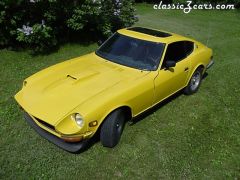
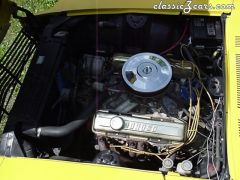
I will tell you all right off that I am computer savvy, BUT, I am also not very savvy with forums, and threads and, tags,and all kinds of other communictaion devices that allow someone to add a thing called "a smiley....." So please bear with me, Make sense? Any way I am in possesion of a 1973 240Z with a chev. 327, backed up behind is an aluminum Muncie 4-speed for the shift-and-get there. Picked up this gem back in 1987 and got rid of all kinds of rusted metal and replaced it with good old fiberglass. If your curious, yes its a Scarab kit, coolest add-on I think. (I apologize to you gods that have the "numbers matching" go fast cars). I have, and will be adding some parts that I would like to sell from some other Z's I really think you all should have. Check out the classifieds as I display my wealth of parts that everyone should go GaGa over. Just my my simple sense of humor, don't take my comments personally, I just like to get a reaction from someone, please?????