


BD240Z
Community Member
-
Joined
-
Last visited
Everything posted by BD240Z
-
 Flat black Rustoleum paint applied to black out the inside of the grill area. On to the body work!!!
-
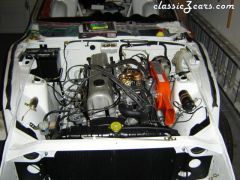 With the exception of the wiper motor/linkage and the hood release cable, the engine bay is done. I'm doing the Honda Accord wiper motor upgrade. Not sure why, I never expect to drive the car in the rain not that it rains here very often anyway.
-
 Decals from Bonzai look real nice, just a few more parts and the engine bay will be finished.
-
 Here's a picture after I started the engine for the first time after the rebuild. I crossed my fingers, turned the key and she fired right up. Big sigh of relief!!!
-
 I decided to work on the front lights wiring system for a change of pace. Thanks to the local Plater, many of the old parts are still servicable and should last many years. These headlight buckets cleaned up nicely.
-
 Those Z Therapy carbs are the best.
-
 This little bugger came shooting out of the tail pipe when I started the engine when I first got the car home. May he/she rest in peace!
-
 More parts assembled, I'm getting real close to firing her up for the first time.
-
 Side view of the engine during re-assembly. It's great to work with new and/or freshly painted parts.
-
 Getting the engine timing components all buttoned up.
-
 Here's the block after installation with the head to follow.
-
 Just starting to re-assemble the engine bay. Installing the fuel/brake lines was a handfull.
-
 It was a bugger painting the underside of the car in my garage. Here's the rear suspension being installed.
-
 It's nice to be over the dirty/grimy stage where you're cleaning everything. Let the re-assembly begin!
-
 Other than dirty, the underside looked really good.
-
 Just a few more components and the interior will be emptied.
-
 I think someone poured oil all over the engine at some time in the past because the crud was a good 1/4 inch.
-
 Another battery tray picture
-
 Typical battery tray rust, fortunately there weren't any holes and the firewall/cowl area wasn't too bad either.
-
 Driver's side with vinyl removed.
-
 I almost have the interior completely removed.
-
 Here's one with the vinyl removed, believe it or not the rust was better than I expected.
-
 Engine in need of attention, I'm thinking some steam cleaning and a little Armor All will get things looking like new!!
-
 Passenger floor prior to removing tar mats. What could be lurking under there?
-
 Another rust condition picture.