ERMINIO's Content - Page 3 - Classic Z Car Club Skip to content

ERMINIO

Community Member
  • Joined

  • Last visited

Everything posted by ERMINIO

  1. ERMINIO posted a gallery image in Body Work and Paint
  2. ERMINIO posted a gallery image in Member Albums
  3. ERMINIO posted a gallery image in Body Work and Paint
  4. ERMINIO posted a gallery image in Member Albums
  5. ERMINIO posted a gallery image in Body Work and Paint
  6. ERMINIO posted a gallery image in Member Albums
  7. ERMINIO posted a gallery image in Body Work and Paint
  8. ERMINIO posted a gallery image in Member Albums
  9. ERMINIO posted a gallery image in Body Work and Paint
  10. ERMINIO posted a gallery image in Member Albums
  11. ERMINIO posted a gallery image in Body Work and Paint
  12. ERMINIO posted a gallery image in Member Albums
  13. ERMINIO posted a gallery image in Body Work and Paint
  14. ERMINIO posted a gallery image in Member Albums
  15. ERMINIO posted a gallery image in Body Work and Paint
  16. ERMINIO posted a gallery image in Member Albums
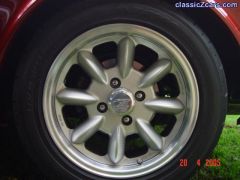
  17. I have 16" wheels. Retained the 4 stud pattern but the rotors I purchased BLANK and drilled the stud holes, same with the commodore rotor.
  18. The Z32 was an upgrade from the VTCommodore/Pintaraset up. I retained the Commodore Front rotors DBA blanks. The size difference is minimal.The hardest part was to make up an adaptor plate for the brakes to fit on. I did the measurements and had them CAD drawn and then cut from 10mm plate.The rears, unless you use the internal h/brake, required an additional H/ brake system. The rear has the Z32 brakes with aftermarket H/break and standard Z32 vented rotors and two brackets. All up much improved to the Commodore/Pintara setup.
  19. Ben If you have not been advised as yet, you can purchase vented rotors from DBA AUSTRALIA. I think their website is www.dba.com.au. Frank (My pen name is ERMINIO To see my gallery)
  20. ERMINIO posted a gallery image in Wheels and Tires

Account

Navigation

Search

Search

Configure browser push notifications

Chrome (Android)
  1. Tap the lock icon next to the address bar.
  2. Tap Permissions → Notifications.
  3. Adjust your preference.
Chrome (Desktop)
  1. Click the padlock icon in the address bar.
  2. Select Site settings.
  3. Find Notifications and adjust your preference.