69 240Z
Community Member
-
Joined
-
Last visited
Everything posted by 69 240Z
-
On German Autobahn we had our 78 280 at indicated 130mph behind two Porsches. One behind us. Is the very first 280 that was registered in Germany. Was a moving good per Paragraph 17 STVZO. (Strassenverkehrszulassungsordnung) I.e.: street traffic registration law. Happened in 1981
-
That is great info so far. Thanks much!!
-
Correct, I need to correct the record
-
okay, thanks, Once I can started on the full restauration I'll look for more stamps. A former local club member has a 2+2 Fairlady in dark wine red. We looked behind the instruments for date codes. Nothing there that looked like it. Any info about the roll cage behind the seats and belts? Also has the rally clock and foot support for the passenger. I have heard that the car was raced in England. So, what was interesting 4482? Also; Need a parts source for the front hood emblem, hoses and the Nissan badge on the trunk as well as the 2000OHC valve cover. Cam would be great too. Previous owner exchanged the valve cover for a polished "Nissan OHC " and changed the cam to a 280Z cam. Grrr. Thanks again! Enno
-
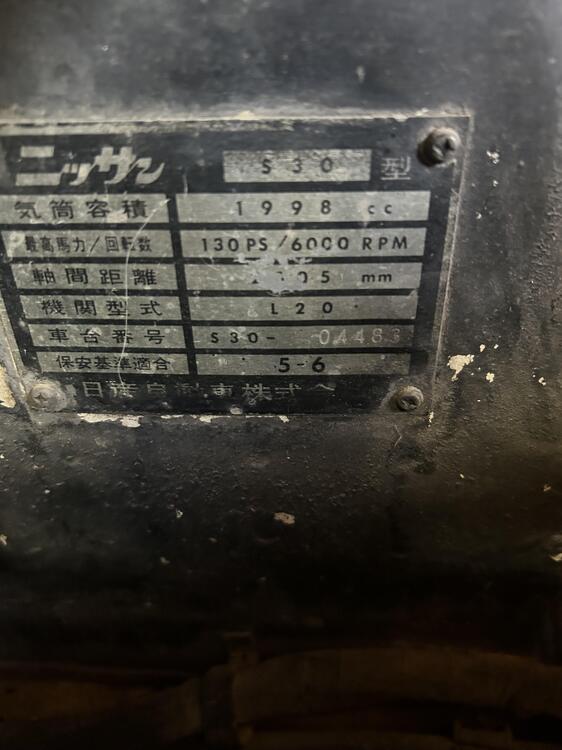
Thanks much for the response! The car sits in a friend’s large building between other z’s and parts. A previous owner painted the engine area in thick black paint. My friend did not find the number. Where is it located? Same place as in LHD cars? Or above the brake booster also? So, he took a picture of the data plate. I had the number wrong. It is the 4483 not 4482. Hope this helps. Car has a roll cage behind the seats and an H-belt, rally clock and foot rest for the passenger. Enno
-
Hi, this is a question for Alan Thomas which supposedly has production dates for the Fairlady Zs? Okay, I have S30-04482. I would like to find out what the production date could be. Also would need the brake booster hoses for it that I can not get here in the US. Thanks much!! Enno