icecapc
Community Member
-
Joined
-
Last visited
Everything posted by icecapc
-
View Advert 1983 280zx Front Driver Side Brake Caliper Looking for 1983 280zx Front Driver Side Brake Caliper Part number: 99-00510B Advertiser icecapc Date 08/25/2022 Price Category Parts Wanted Year 1983 Model Datsun 280
-
Y'all were right I had the wrong numbers! Getting Old...bad Eyes. Laughs.
-
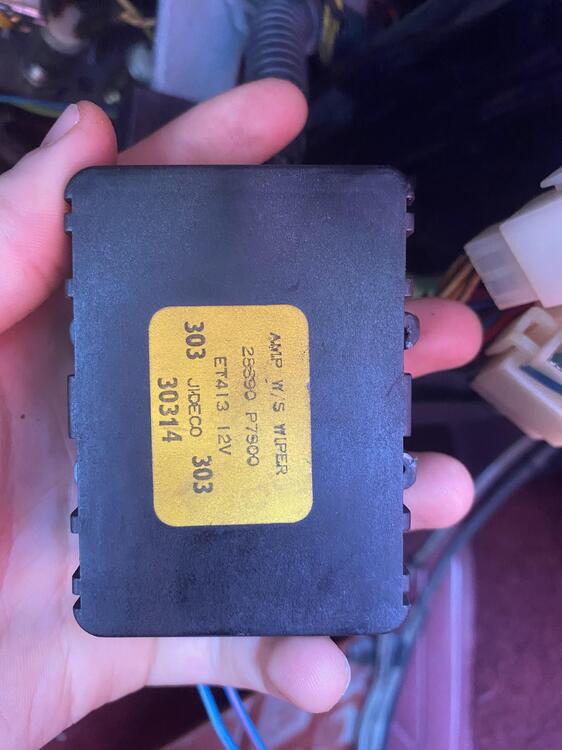
Steve not sure where that number came from. the one I have is: 28590 P7500 not 7900
-
I pulled the numbers from the Wiper AMP the last time we took it off. I'll pull it off and post a picture this weekend. Laughs is yours for sale?
-
Thanks Terrapin
-
Thanks Steve
-
so what I am gathering is that the 28890-P7900 will work just fine?! I just want to make sure it's interchangeable with 28590-P7500
-
@EuroDat
-
Looking for a replacement for a 1983 Datsun 280ZX Wiper Amplifier Details on Current Wiper Amplifier: AMP W/S Wiper 28590 P7500 ET413 12 303 JiDECO 303 30314 83 280ZX
-
I'll try that. Thank you.
-
Looking for Shift Inserts aka "Dogs" For 1983 Datsun 280ZX transmission aka Insert-Shifting, Overdrive. Original MFG SKU: C2609-P9501 (Discontinued) Does anyone know if the 300zx shift inserts (SKU: 32609-23P00), link below, would work as a replacement for the 280zx? https://www.carcraze.com.au/nissan-oem-shifter-insert-1st-2nd-nissan-300zx-z32
-
View Advert Shift Inserts aka "Dogs" For Datsun 280ZX Looking for C2609-P9501 Shift Inserts aka "Dogs" For 1983 Datsun 280ZX also known as Insert-Shifting, Overdrive Advertiser icecapc Date 04/05/2022 Price Category Parts Wanted Year 1983 Model Datsun 280
-
absolutely, how much?
-
for 3-4 or 5th and reverse?
-
absolutely, how much?
-
Thanks Steve. Yeah I am looking for the internal shift forks.
-
Rebuilding a 1983 Datsun 280zx transmission but having problems getting the shifter forks. Anyone know where to 1983 Datsun 280zx 5-speed manual transmission 1983 Nissan/Datsun 280ZX 2.8L MFI SOHC 6cyl 3rd - 4th Shift fork 5th & Reverse Shift Fork